How to Wear Open-Ear Headphones
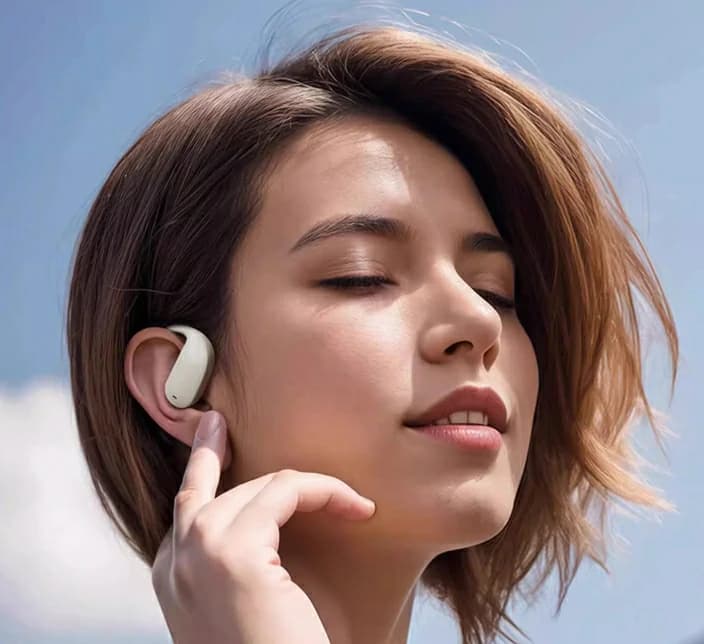
Open-Ear headphones require precision fitting for optimal performance. Precisely aligning them can significantly boost the fidelity of your listening experience. This guide provides essential advice on how to wear open-Eared headphones for superior sound field and pristine audio quality.
Overview of Open-Ear Headphones

Open-Ear vs. Closed-Ear Headphones
Firstly, distinguish between open-Ear and closed-Ear headphones. Closed-Ears confine sound, blocking external noise, whereas open-Ears allow free airflow and sound transmission, creating a natural, expansive sound field akin to being in a live music venue.
Pros of Open-Ear Headphones
Natural sound field: Ideal for music enthusiasts seeking true audio reproduction.
Clear sound quality: Unaltered bass and midrange delivery, enabling listeners to appreciate music as intended.
Sound Leakage: A Consideration
Open-Ear headphones tend to leak sound, potentially disturbing others nearby at high volumes. Hence, ideal for serene, private settings, but not suitable for public spaces.
Proper Wearing Techniques

Step 1: Adjust the Headband and Earmuffs
Start by adjusting the headband. Most open-Ear headphones feature adjustable headbands for a customized fit. The goal is to achieve a snug yet comfortable fit.
Note: The headband should sit atop your head, evenly distributing the headphones' weight.
Step 2: Secure the Earmuffs
Ensure the earmuffs fully cover your ears for optimal sound quality and comfort.
Suggestion: Rotate the ear cups slightly for maximum comfort. The foam padding should envelop your ears without excessive pressure.
Step 3: Maintain Good Posture
Avoid discomfort by maintaining a straight posture during long listening sessions. Avoid slouching to avoid neck and shoulder strain.
Tips for Improving Comfort

Memory Foam Earmuffs
Improved comfort can be achieved by incorporatingMEMORY FOAM or breathable material ear pads, which conform to various head shapes and reduce pressure points.
Regular Breaks
To prevent ear fatigue, take regular breaks (approx. 5-10 min hourly) to give your ears respite.
Position and Angle Adjustments
Small adjustments can often improve comfort levels. Try altering the headphones' angle or position if discomfort persists.
Usage Environment Recommendations

Best Environments for Open-Ear Headphones
Open-Ear headphones excel in quiet indoor settings. Ideal for music creation/editing or personal music enjoyment.
Caution for Public Use
Despite their superior sound quality, open-Ear headphones' sound leakage could disrupt public spaces. Low volume or private settings are recommended when using them in public locations such as libraries or cafes.
Open-Ear Headphone Care & Maintenance

Earmuff & Headband Cleaning
Accumulation of perspiration, dust, and skin oils necessitates regular cleaning of earmuffs and headbands for hygiene.
Cleaning Method: Utilize a damp cloth and mild soap to gently clean the ear pads and headband. Avoid submerging the headphones or employing harsh chemicals.
Storage Guidelines: Store unused headphones in a protective case or dry location. Avoid exposure to direct sunlight or extreme temperatures to preserve material integrity and longevity.
Open-Ear Headphones FAQ

Open-Ear Headphone Noise Leakage
Open-Ear headphones exhibit noise leakage due to their design promoting airflow and soundstage, albeit compromising isolation. Minimize leakage by:
Suggestion 1: Diminish volume when sharing space.
Suggestion 2: Consider utilizing anti-leakage earmuffs, although they might marginally impact sound quality.
Headphone Lifespan Extension
Beyond cleaning, routine inspection for signs of wear and tear on components such as ear pads, headband, and cable is essential.
Replacement Parts: Over time, ear pads may lose shape impacting comfort and sound quality. Brands often provide replacements, allowing for a refreshed headset without buying anew.
Damaged Part Repair: Early detection and resolution of sound issues or physical damage prolongs the life of headphones and maintains superior audio quality.
Kinglucky i20 Open-Ear Headphones

Kinglucky i39 Open-Ear Headphones

Kinglucky i211 Open-Ear Headphones

Overview of Open-Ear Headphones
Firstly, distinguish between open-Ear and closed-Ear headphones. Closed-Ears confine sound, blocking external noise, whereas open-Ears allow free airflow and sound transmission, creating a natural, expansive sound field akin to being in a live music venue.
Pros of Open-Ear Headphones
Natural sound field: Ideal for music enthusiasts seeking true audio reproduction.
Clear sound quality: Unaltered bass and midrange delivery, enabling listeners to appreciate music as intended.
Sound Leakage: A Consideration
Open-Ear headphones tend to leak sound, potentially disturbing others nearby at high volumes. Hence, ideal for serene, private settings, but not suitable for public spaces.
Proper Wearing Techniques
Start by adjusting the headband. Most open-Ear headphones feature adjustable headbands for a customized fit. The goal is to achieve a snug yet comfortable fit.
Note: The headband should sit atop your head, evenly distributing the headphones' weight.
Step 2: Secure the Earmuffs
Ensure the earmuffs fully cover your ears for optimal sound quality and comfort.
Suggestion: Rotate the ear cups slightly for maximum comfort. The foam padding should envelop your ears without excessive pressure.
Step 3: Maintain Good Posture
Avoid discomfort by maintaining a straight posture during long listening sessions. Avoid slouching to avoid neck and shoulder strain.
Tips for Improving Comfort
Improved comfort can be achieved by incorporatingMEMORY FOAM or breathable material ear pads, which conform to various head shapes and reduce pressure points.
Regular Breaks
To prevent ear fatigue, take regular breaks (approx. 5-10 min hourly) to give your ears respite.
Position and Angle Adjustments
Small adjustments can often improve comfort levels. Try altering the headphones' angle or position if discomfort persists.
Usage Environment Recommendations
Open-Ear headphones excel in quiet indoor settings. Ideal for music creation/editing or personal music enjoyment.
Caution for Public Use
Despite their superior sound quality, open-Ear headphones' sound leakage could disrupt public spaces. Low volume or private settings are recommended when using them in public locations such as libraries or cafes.
Open-Ear Headphone Care & Maintenance
Accumulation of perspiration, dust, and skin oils necessitates regular cleaning of earmuffs and headbands for hygiene.
Cleaning Method: Utilize a damp cloth and mild soap to gently clean the ear pads and headband. Avoid submerging the headphones or employing harsh chemicals.
Storage Guidelines: Store unused headphones in a protective case or dry location. Avoid exposure to direct sunlight or extreme temperatures to preserve material integrity and longevity.
Open-Ear Headphones FAQ
Open-Ear headphones exhibit noise leakage due to their design promoting airflow and soundstage, albeit compromising isolation. Minimize leakage by:
Suggestion 1: Diminish volume when sharing space.
Suggestion 2: Consider utilizing anti-leakage earmuffs, although they might marginally impact sound quality.
Open-Ear Headphone Care & Maintenance
Headphone Lifespan Extension
Beyond cleaning, routine inspection for signs of wear and tear on components such as ear pads, headband, and cable is essential.
Replacement Parts: Over time, ear pads may lose shape impacting comfort and sound quality. Brands often provide replacements, allowing for a refreshed headset without buying anew.
Damaged Part Repair: Early detection and resolution of sound issues or physical damage prolongs the life of headphones and maintains superior audio quality.
Open-Ear Headphone Recommendations
Kinglucky i20 Open-Ear Headphones
- Provides an immersive music experience with a new ear clip design for stable, comfortable wear.
- Features Pulse DT3.0 directional sound transmission, significantly reducing sound leakage while maintaining superior audio quality.
- Includes adjustable memory titanium wire for long-lasting comfort, designed to fit different head shapes without deformation.
Kinglucky i39 Open-Ear Headphones
- Offers vibrant panoramic bass enhancement and AURA vocal enhancement,which delivers natural-sounding vocals for an enhanced listening experience.
- Designed for long-lasting comfort with a lightweight, non-invasive fit, making it perfect for extended listening sessions.
- Utilizes DT6.0 Directional Sound Transmission to reduce sound leakage by 93%, ideal for private listening in quiet environments.
Kinglucky i211 Open-Ear Headphones
- Equipped with Pulse DT3.0 directional sound transmission and SSOVP-EXTREME AI digital enhancement technology, providing high-frequency clarity and superior sound detail.
- Lightweight and adjustable, the memory titanium wire ensures comfort during long listening sessions, adapting to various head shapes.
- Features a full-color smart screen for easy control of music and calls, enhancing user convenience.
Conclusion
Correct usage of open-Ear headphones extends beyond comfort to maximize sound quality and enhance listening experience. Proper adjustment, storage, and usage in appropriate environments ensure optimal audio performance.Recommended Products