
How to Use a Mini Karaoke Machine
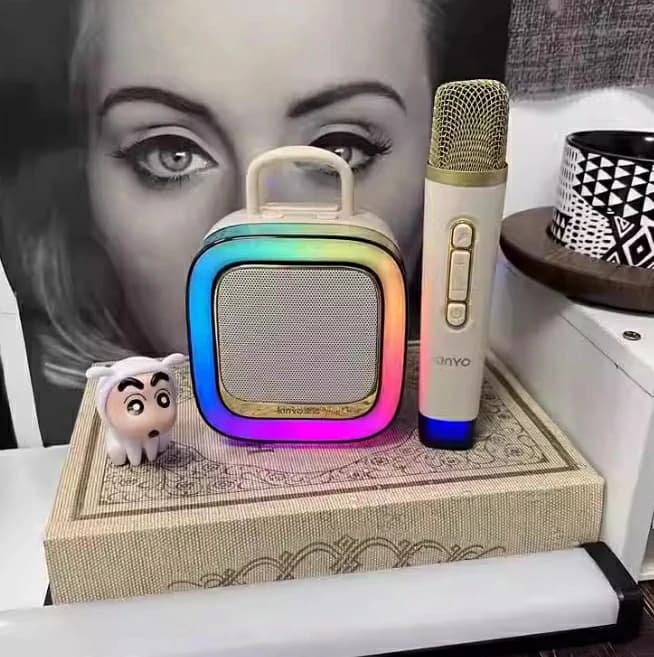
Whether you’re hosting a party, practicing vocals, or simply enjoying a solo singing session, a mini karaoke machine is the ultimate entertainment companion. But if you’re new to portable karaoke systems, you might wonder: How do I set it up? What features should I prioritize? In this comprehensive guide, we’ll walk you through everything you need to know about using a mini karaoke machine effectively—with a focus on the K88 Karaoke Machine, a userfriendly device designed for seamless singing experiences.
Why Choose a Mini Karaoke Machine?
Mini karaoke machines combine portability, powerful sound, and multifunctional features in a compact design. They’re ideal for:
Small gatherings: Perfect for living rooms, dorm rooms, or outdoor picnics.
Travelfriendly fun: Lightweight and easy to pack.
Allinone solutions: Many models, like the K88 Karaoke Machine, include builtin microphones, Bluetooth connectivity, and audio effects.
For beginners, simplicity is key. The K88, for example, eliminates complex setups with its plugandplay design, making it accessible even for nontech users.
Step 1: Unboxing and Initial Setup
What’s in the Box?
Most mini karaoke machines include:
The main speaker unit
One or two wireless microphones
Charging cables (USB or AC adapter)
Auxiliary cables for wired connections
K88 Tip: The K88 Karaoke Machine comes with a rechargeable battery, dual wireless mics, and a carrying strap, so you can start singing within minutes of unboxing.
FirstTime Charging:
1. Fully charge the device using the provided cable.
2. Charge the microphones (if wireless) separately.
Pro Tip: The K88’s 20W battery lasts up to 8 hours, ensuring uninterrupted fun.
Step 2: Connecting Your Devices
Option 1: Bluetooth Pairing
1. Turn on the karaoke machine and enable Bluetooth mode.
2. Open your smartphone/tablet’s Bluetooth settings and select the device (e.g., “K88 Speaker”).
3. Play music from apps like Spotify or YouTube—your mini karaoke machine now acts as a speaker!
Option 2: Wired Connections
Use the AUX cable to connect to nonBluetooth devices (e.g., TVs or older MP3 players).
Insert a USB drive with MP3 files directly into the machine’s port.
K88 Advantage: The K88 supports dual connectivity, allowing you to sing from Bluetooth and a USB drive simultaneously—ideal for karaoke hosts managing playlists.
Step 3: Adjusting Audio Settings
To optimize sound quality:
1. Microphone Volume: Adjust the mic level to avoid feedback or distortion.
2. Echo/Reverb: Add depth to vocals using builtin effects. The K88 offers 5 reverb modes, from “Studio” to “Concert Hall.”
3. Bass/Treble: Finetune the balance for your music genre.
Troubleshooting Tip: If the audio lags, ensure your Bluetooth source is within 33 feet (10 meters) of the machine.
Step 4: Singing with Confidence
Finding Karaoke Tracks:
Use apps like YouTube (search “[song name] karaoke version”) or dedicated karaoke platforms.
Download karaoke tracks to a USB drive for offline use.
K88 Bonus: The K88’s RealTime Voice Enhancement technology reduces background noise and sharpens vocals, so even beginners sound like pros.
Step 5: Maintaining Your Mini Karaoke Machine
1. Clean the Microphones: Wipe mics with a soft cloth after use to prevent dust buildup.
2. Store Properly: Keep the device in a dry, cool place. The K88’s compact design fits easily in closets or carryon bags.
3. Firmware Updates: Check the manufacturer’s website periodically for software upgrades.
Why the K88 Karaoke Machine Stands Out
While many mini karaoke machines offer basic features, the K88 goes further:
- Portability: Weighing just 2.2 lbs, it’s easy to carry anywhere.
- Dual Wireless Mics: No tangled cords—perfect for duets.
- Long Battery Life: 8 hours of playtime on a single charge.
- Multipurpose Use: Acts as a Bluetooth speaker, FM radio, or even a power bank for your phone.
FAQs About Using Mini Karaoke Machines
Q: Can I connect the K88 to my TV?
A: Yes! Use the AUX cable or Bluetooth to sync with your TV for movie nights with amplified sound.
Q: How do I reduce feedback?
A: Keep microphones away from the speaker and lower the mic volume if needed.
Q: Is the K88 compatible with all devices?
A: It works with iOS, Android, laptops, and most devices with Bluetooth or AUX ports.
Final Thoughts
Mastering a mini karaoke machine is all about simplicity and fun. With the K88 Karaoke Machine, you get a hasslefree setup, professional sound quality, and versatile features that cater to both beginners and seasoned singers. Whether you’re belting out classics or hosting a dance party, this compact powerhouse ensures every moment is filled with music and joy.