How to Charge a Power Bank Portable Charger
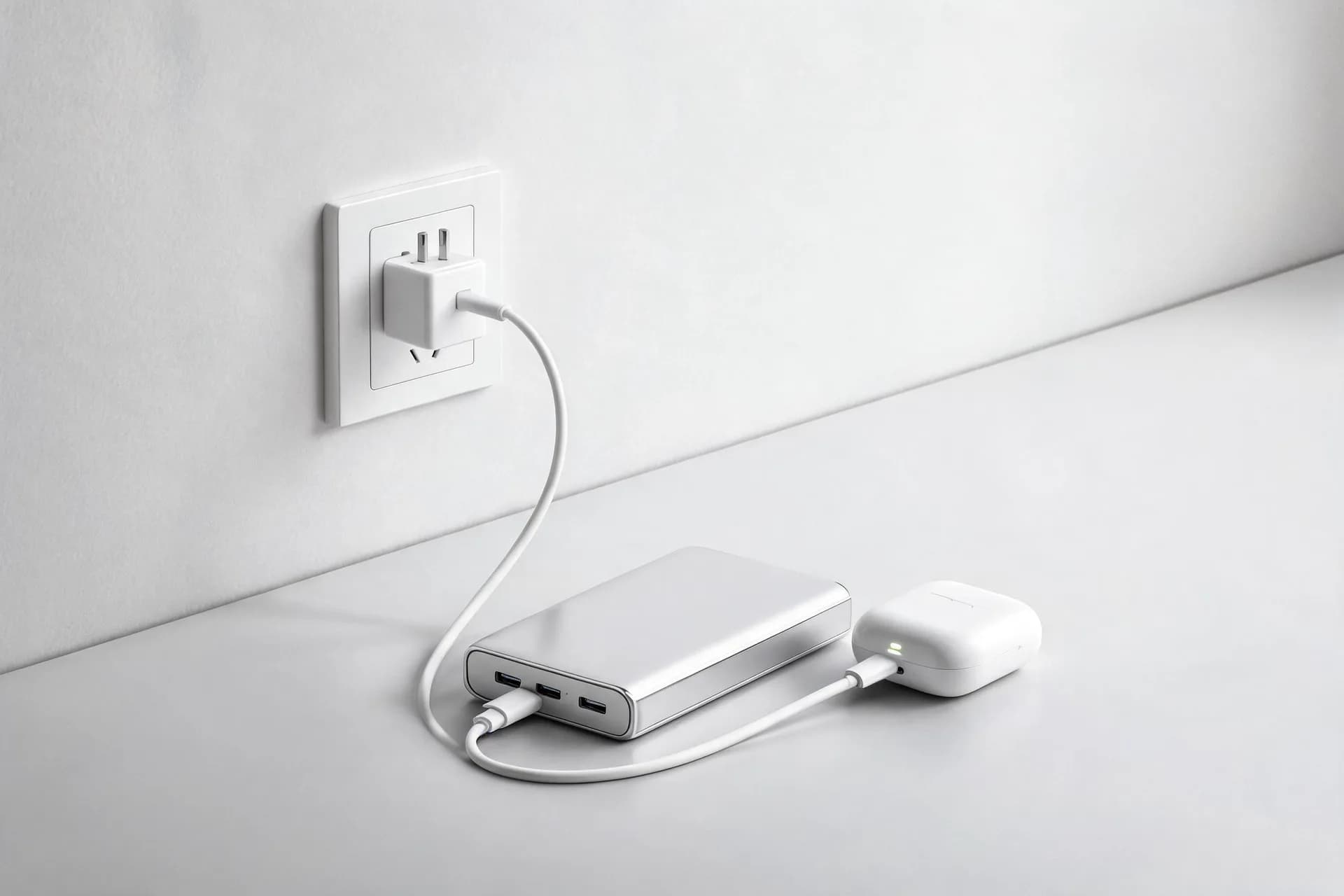
The significance of device connectivity has amplified in this technology-centric era. Be it binge-watching shows, maximizing productivity, or maintaining social ties, charging设备 is inevitable. Your portable battery backup - or power bank - serves as a contemporary lifeline. However, what if your power bank depletes? Fear not! This succinct guide elucidates the correct method to recharge a power bank.
1. Basic Operation
Charging Your Mobile Power Bank
Charging operation varies based on model; follow this general guide:
a. Confirm Input Specifications: Locate power bank’s input voltage and amperage, typically located on the back or in the manual. Typical values are 5V/2A or 5V/1A. Use corresponding charger.
b. Connect to Power Source: Utilize the supplied cable (USB-C, Micro-USB, or Lightning connector), connect to a wall adapter, computer, or other USB power source. Wall outlets offer the fastest charge.
c. Monitor Charging Progress: Most power banks feature indicator lights indicating charging status. Once all lights are lit or the display reads 100%, disconnect.
a. Position on Charging Pad: For wireless power banks, align correctly onto a compatible charging pad.
b. Monitor Indicator Lights: As wireless charging takes longer, monitor indicator lights regularly.
2. Safety Guidelines for Power Bank Usage
 Power banks are generally safe, but misuse can cause issues. Follow these guidelines for safe usage:
2.1 Avoid Overcharging: Modern power banks incorporate safety measures against overcharging, yet it's advisable to disconnect once full to prevent heat build-up and extend battery life.
2.2 Prevent Over-Discharging: Maintain your power bank’s charge between 20% and 80%. Frequent discharge below 0% can reduce its lifespan.
2.3 Safe Storage: Store your power bank in a cool, dry location, ideally at 50% charge. This preserves battery health, particularly for long periods without use.
2.4 Recognizing and Managing Safety Risks
Report any of the following issues promptly:
Battery Swelling: Sign of internal damage and potential leakage or combustion. Dispose safely.
Overheating: Unplug and allow cooling if the power bank gets excessively hot during charging. Persistent overheating indicates battery compromise.
3. Charging Speed and Efficiency
 Factors influencing charging speed include input power, charging cable quality, ambient temperature, and charger efficiency. Follow these tips for improved charging efficiency:
a. Input Power: Higher input amperage and voltage result in faster charging. Power banks with 2A input charge faster than 1A.
b. Charging Cable: Quality cables enhance charging speed. Damaged or inferior cables can hinder charging.
c. Ambient Temperature: Charging in extreme conditions can slow down charging or damage the battery. Opt for room temperature charging.
a. Use a High-Efficiency Charger: Wall chargers exceeding the power bank's input rating will expedite charging.
b. Charge in a Cool Environment: Avoid charging in direct sunlight or close proximity to heat sources. Heat reduces charging efficiency and potentially damages the battery.
c. Use Shorter Cables: Shorter cables facilitate faster charging due to reduced resistance.
4. Maintenance and Care
 Proper maintenance of your power bank extends its lifespan and optimizes performance.
4.1 Maintenance Guidelines
Regular Charging: Dormant power banks require charging periodically to maintain battery health.
Ensure Cleanliness: Regularly wipe down the power bank with a dry cloth to prevent debris accumulation.
Handle with Caution: Avoid dropping as physical damage can cause internal battery issues.
4.2 Frequent Problems and Solutions
Power Bank Non-Charging: Inspect the cable and port first. If intact, replace the charger. If issue persists, consider replacing the battery.
Rapid Power Bank Discharge: A deteriorated battery might be causing this problem. Lithium-ion batteries lose capacity over time necessitating replacement.
4.3 Basic Repairs
USB Port Cleaning: If charging issues persist, clean the USB ports with a soft brush or compressed air.
Battery Resetting: Some power banks possess a reset function (typically a small hole near the port). Utilize a paperclip to activate the reset button when the device malfunctions.
Based on specific usage requirements, we recommend these power banks:
 Capacity: 10,000mAh
Features: Fast charging (up to 20W wired) and wireless charging capabilities. Can simultaneously charge four devices, perfect for frequent travelers.
Travel Benefits: Compact, portable design allows for multi-device charging during extended journeys. Built-in cables eliminate the need for additional cords.
 Capacity: 5,000mAh
Features: Secure wireless charging via a magnetic design, dual charging modes, and intelligent temperature control for enhanced safety.
Daily Usage Advantages: Small, lightweight, and easily transportable. Safety features and sleek design make it ideal for everyday charging.
Conclusion
Understanding the proper way to charge a power bank portable charger is crucial for guaranteeing its durability and performance. By adhering to the steps detailed in this guide, you can charge your power bank safely and effectively, enhance the charging speed, and maintain it in prime condition for many years. Moreover, if you are in the market for a new power bank, the Kinglucky 183 and Kinglucky 186 present outstanding choices customized to diverse requirements.
1. Basic Operation

Charging operation varies based on model; follow this general guide:
1.1 Standard Power Banks (Wired)
a. Confirm Input Specifications: Locate power bank’s input voltage and amperage, typically located on the back or in the manual. Typical values are 5V/2A or 5V/1A. Use corresponding charger.
b. Connect to Power Source: Utilize the supplied cable (USB-C, Micro-USB, or Lightning connector), connect to a wall adapter, computer, or other USB power source. Wall outlets offer the fastest charge.
c. Monitor Charging Progress: Most power banks feature indicator lights indicating charging status. Once all lights are lit or the display reads 100%, disconnect.
1.2 Wireless Charging Power Banks
a. Position on Charging Pad: For wireless power banks, align correctly onto a compatible charging pad.
b. Monitor Indicator Lights: As wireless charging takes longer, monitor indicator lights regularly.
2. Safety Guidelines for Power Bank Usage
2.1 Avoid Overcharging: Modern power banks incorporate safety measures against overcharging, yet it's advisable to disconnect once full to prevent heat build-up and extend battery life.
2.2 Prevent Over-Discharging: Maintain your power bank’s charge between 20% and 80%. Frequent discharge below 0% can reduce its lifespan.
2.3 Safe Storage: Store your power bank in a cool, dry location, ideally at 50% charge. This preserves battery health, particularly for long periods without use.
2.4 Recognizing and Managing Safety Risks
Report any of the following issues promptly:
Battery Swelling: Sign of internal damage and potential leakage or combustion. Dispose safely.
Overheating: Unplug and allow cooling if the power bank gets excessively hot during charging. Persistent overheating indicates battery compromise.
3. Charging Speed and Efficiency
3.1 Factors Affecting Charging Speed
a. Input Power: Higher input amperage and voltage result in faster charging. Power banks with 2A input charge faster than 1A.
b. Charging Cable: Quality cables enhance charging speed. Damaged or inferior cables can hinder charging.
c. Ambient Temperature: Charging in extreme conditions can slow down charging or damage the battery. Opt for room temperature charging.
3.2 Tips to Improve Charging Efficiency
a. Use a High-Efficiency Charger: Wall chargers exceeding the power bank's input rating will expedite charging.
b. Charge in a Cool Environment: Avoid charging in direct sunlight or close proximity to heat sources. Heat reduces charging efficiency and potentially damages the battery.
c. Use Shorter Cables: Shorter cables facilitate faster charging due to reduced resistance.
4. Maintenance and Care
4.1 Maintenance Guidelines
Regular Charging: Dormant power banks require charging periodically to maintain battery health.
Ensure Cleanliness: Regularly wipe down the power bank with a dry cloth to prevent debris accumulation.
Handle with Caution: Avoid dropping as physical damage can cause internal battery issues.
4.2 Frequent Problems and Solutions
Power Bank Non-Charging: Inspect the cable and port first. If intact, replace the charger. If issue persists, consider replacing the battery.
Rapid Power Bank Discharge: A deteriorated battery might be causing this problem. Lithium-ion batteries lose capacity over time necessitating replacement.
4.3 Basic Repairs
USB Port Cleaning: If charging issues persist, clean the USB ports with a soft brush or compressed air.
Battery Resetting: Some power banks possess a reset function (typically a small hole near the port). Utilize a paperclip to activate the reset button when the device malfunctions.
5. Product Suggestions
Based on specific usage requirements, we recommend these power banks:
5.1 Ideal for Travel: Kinglucky 186 Power Bank
Features: Fast charging (up to 20W wired) and wireless charging capabilities. Can simultaneously charge four devices, perfect for frequent travelers.
Travel Benefits: Compact, portable design allows for multi-device charging during extended journeys. Built-in cables eliminate the need for additional cords.
5.2 Suitable for Daily Use: Kinglucky 183 Power Bank
Features: Secure wireless charging via a magnetic design, dual charging modes, and intelligent temperature control for enhanced safety.
Daily Usage Advantages: Small, lightweight, and easily transportable. Safety features and sleek design make it ideal for everyday charging.
Conclusion
Understanding the proper way to charge a power bank portable charger is crucial for guaranteeing its durability and performance. By adhering to the steps detailed in this guide, you can charge your power bank safely and effectively, enhance the charging speed, and maintain it in prime condition for many years. Moreover, if you are in the market for a new power bank, the Kinglucky 183 and Kinglucky 186 present outstanding choices customized to diverse requirements.
Recommended Products