
How to Use Singing Machine Karaoke? 3 Minutes to Let You Know How to Use It
Karaoke is a cherished pastime, whether one possesses exceptional vocal talent or prefers to sing solitarily in their showers. It's the perfect medium for bonding during parties, family gatherings, or as a relaxation technique post-work exhaustion. Yet, not everyone comprehends the setup process of a karaoke machine. If you possess a Kinglucky K12 Karaoke Machine and require guidance on its usage, we are here to assist! This concise three-minute guide provides all necessary information about the Kinglucky K12.
I. Unpacking and Configuring Your Kinglucky K12 Karaoke Machine
 To initiate the karaoke journey, unpack your Kinglucky K12. The contents include:
The Kinglucky K12 Karaoke Machine: Compact and user-friendly.
Microphones: Some kits feature wireless mics for duet performances.
Charging Cables and Adapters: Ensure continuous operation.
Instruction Manual: Your indispensable companion.
Prioritize charging your Kinglucky K12. Its 1800mAh rechargeable battery offers up to 8 hours of playback. Simply attach the charging cable and allow sufficient time for recharging.
II. Connecting Your Device
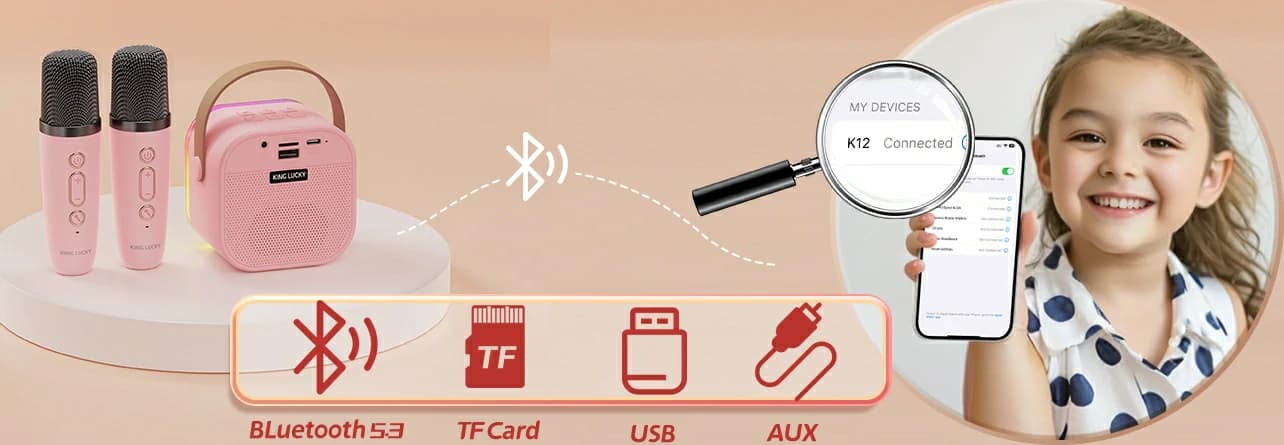
With the Kinglucky K12 fully charged, proceed to establish a connection with your device. The K12 boasts versatile connectivity options:
1. Bluetooth Connection: Turn on Bluetooth on your mobile device, locate "Kinglucky K12" within the list of available devices, and pair accordingly.
2. TF Card/USB: Directly access songs stored on a memory card or USB drive via the respective slots.
3. AUX Connection: Non-Bluetooth devices can also participate using the provided AUX cable.
All these methods guarantee superior audio quality due to the K12's advanced MP3 audio decoding technology and full digital audio processing.
III. Selecting Your Song and Microphone
 Post-device connection, select your preferred song. Launch your preferred karaoke app, YouTube, or music player and embark on your musical adventure. Benefit from the K12's impressive 360° surround sound and ensure optimal audibility of each note.
Moving onto the microphones. Activate the wireless microphones if present; otherwise, utilize the supplied microphone connection cable. Assemble your ensemble and release your inner diva!
IV. Enjoyment Through Innovative Features
The unique feature of the Kinglucky K12 effectively transforms traditional karaoke sessions into lively parties through five exciting voice modes, versatile lighting effects, and advanced acoustic technology.
V.Is the kinglucky K12 compatible with different devices?
 The Kinglucky K12 is designed to be compatible with a variety of devices. As an intelligent learning device, it utilizes the latest technology to provide seamless learning experience across several platforms. This means that students can easily stream educational content from their Kinglucky K12 to their laptops, tablets, and smartphones. Additionally, the device is equipped with a user-friendly interface that allows for easy navigation and access to various features. Therefore, students can take their learning experience with them wherever they go, ensuring that they stay connected to their education.
Ⅵ.What are some popular karaoke apps and platforms?
Karaoke has gained immense popularity in recent years and there are numerous apps and platforms available that cater to this growing interest. Here are some of the most popular karaoke apps and platforms:
1. Sing! Karaoke by Smule: This app is one of the most popular karaoke apps available. It features a wide range of songs, from classic hits to modern chart-toppers, and allows users to sing along with their favorite artists. The app also provides real-time feedback and allows users to record and share their performances.
2. Karaoke by Smule: Similar to Sing! Karaoke, Karaoke by Smule offers a wide range of songs and features. However, it also includes a feature that allows users to create their own karaoke tracks by mixing and matching different vocal tracks.
3. Karaoke Stars by ReverbNation: This app is specifically designed for karaoke enthusiasts who want to perform live. It allows users to connect with other singers and hosts karaoke nights in their local area. The app also provides tips and advice on how to improve your singing skills.
4. Karaoke by Acapela Group: This app is specifically designed for those who want to sing in different languages. It features a wide range of songs in different languages, including English, Spanish, French, and more. The app also provides real-time translation of the lyrics, making it easier for users to sing along.
5. Karaoke by StarMaker: This app is specifically designed for karaoke enthusiasts who want to perform in front of a live audience. It allows users to connect with other singers and hosts karaoke nights in their local area. The app also provides tips and advice on how to improve your singing skills.
Ⅶ.Frequently Asked Questions
 Q: Is the Kinglucky K12 suitable for outdoor usage?
A: Yes, the device is portable and can be taken to various outdoor locations provided it is fully charged.
Q: How can I enhance the sound quality?
A: The Kinglucky K12 offers superior sound quality due to its DSP chip and 3D surround sound. Optimal audio is achieved by selecting a room with appropriate acoustics.
Q: Why is the microphone not functioning properly?
A: Ensure the microphone is charged, replace batteries as needed, and pair it correctly with the Kinglucky K12. For wired mics, verify the connections.
Q: Can I connect multiple devices simultaneously to the Kinglucky K12?
A: No, the Kinglucky K12 only supports one connection per device to guarantee optimal sound quality and stability. Disconnect previous devices prior to connecting others.
Conclusion
Karaoke is not merely about singing but also about enjoyment, relaxation, and capturing moments. The Kinglucky K12 Karaoke Machine simplifies this process with its user-friendly setup, diverse connectivity options, innovative voice modes, and dynamic lighting effects. It transforms any event into an unforgettable experience. Thus, understanding how to operate the singing machine karaoke takes no longer than three minutes! Grab your Kinglucky K12, select your preferred song, and prepare to perform.
I. Unpacking and Configuring Your Kinglucky K12 Karaoke Machine
The Kinglucky K12 Karaoke Machine: Compact and user-friendly.
Microphones: Some kits feature wireless mics for duet performances.
Charging Cables and Adapters: Ensure continuous operation.
Instruction Manual: Your indispensable companion.
Prioritize charging your Kinglucky K12. Its 1800mAh rechargeable battery offers up to 8 hours of playback. Simply attach the charging cable and allow sufficient time for recharging.
II. Connecting Your Device
With the Kinglucky K12 fully charged, proceed to establish a connection with your device. The K12 boasts versatile connectivity options:
1. Bluetooth Connection: Turn on Bluetooth on your mobile device, locate "Kinglucky K12" within the list of available devices, and pair accordingly.
2. TF Card/USB: Directly access songs stored on a memory card or USB drive via the respective slots.
3. AUX Connection: Non-Bluetooth devices can also participate using the provided AUX cable.
All these methods guarantee superior audio quality due to the K12's advanced MP3 audio decoding technology and full digital audio processing.
III. Selecting Your Song and Microphone
Moving onto the microphones. Activate the wireless microphones if present; otherwise, utilize the supplied microphone connection cable. Assemble your ensemble and release your inner diva!
IV. Enjoyment Through Innovative Features
The unique feature of the Kinglucky K12 effectively transforms traditional karaoke sessions into lively parties through five exciting voice modes, versatile lighting effects, and advanced acoustic technology.
V.Is the kinglucky K12 compatible with different devices?
Ⅵ.What are some popular karaoke apps and platforms?
Karaoke has gained immense popularity in recent years and there are numerous apps and platforms available that cater to this growing interest. Here are some of the most popular karaoke apps and platforms:
1. Sing! Karaoke by Smule: This app is one of the most popular karaoke apps available. It features a wide range of songs, from classic hits to modern chart-toppers, and allows users to sing along with their favorite artists. The app also provides real-time feedback and allows users to record and share their performances.
2. Karaoke by Smule: Similar to Sing! Karaoke, Karaoke by Smule offers a wide range of songs and features. However, it also includes a feature that allows users to create their own karaoke tracks by mixing and matching different vocal tracks.
3. Karaoke Stars by ReverbNation: This app is specifically designed for karaoke enthusiasts who want to perform live. It allows users to connect with other singers and hosts karaoke nights in their local area. The app also provides tips and advice on how to improve your singing skills.
4. Karaoke by Acapela Group: This app is specifically designed for those who want to sing in different languages. It features a wide range of songs in different languages, including English, Spanish, French, and more. The app also provides real-time translation of the lyrics, making it easier for users to sing along.
5. Karaoke by StarMaker: This app is specifically designed for karaoke enthusiasts who want to perform in front of a live audience. It allows users to connect with other singers and hosts karaoke nights in their local area. The app also provides tips and advice on how to improve your singing skills.
Ⅶ.Frequently Asked Questions
A: Yes, the device is portable and can be taken to various outdoor locations provided it is fully charged.
Q: How can I enhance the sound quality?
A: The Kinglucky K12 offers superior sound quality due to its DSP chip and 3D surround sound. Optimal audio is achieved by selecting a room with appropriate acoustics.
Q: Why is the microphone not functioning properly?
A: Ensure the microphone is charged, replace batteries as needed, and pair it correctly with the Kinglucky K12. For wired mics, verify the connections.
Q: Can I connect multiple devices simultaneously to the Kinglucky K12?
A: No, the Kinglucky K12 only supports one connection per device to guarantee optimal sound quality and stability. Disconnect previous devices prior to connecting others.
Conclusion
Karaoke is not merely about singing but also about enjoyment, relaxation, and capturing moments. The Kinglucky K12 Karaoke Machine simplifies this process with its user-friendly setup, diverse connectivity options, innovative voice modes, and dynamic lighting effects. It transforms any event into an unforgettable experience. Thus, understanding how to operate the singing machine karaoke takes no longer than three minutes! Grab your Kinglucky K12, select your preferred song, and prepare to perform.