
Phone Selfie Light Tutorial to Share: Say Goodbye to Dark Selfie Trouble
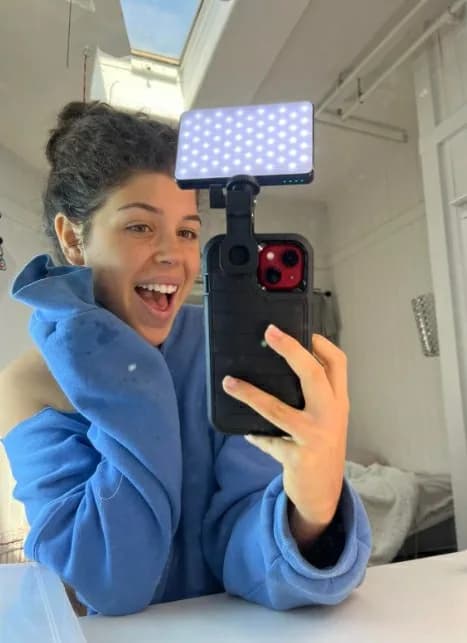
Experienced selfie obstacles due to insufficient lighting? Ruled by dark selfies? Cambridge, your gripes can cease here. The phone selfie light, a revolutionary tool in mobile photography, serves as your savior.
This guide elucidates how effectively utilizing a phone selfie light can eradicate such issues. Regardless if you're a seasoned selfie artist or aiming to elevate your social media presence, this guide is your companion. Let's embark on this journey towards brighter selfies!

Why a Phone Selfie Light Is Essential
The necessity of a phone selfie light is evident. Your phone's flash may suffice occasionally, but it often results in overcast or harsh shadows. A phone selfie light, however, illuminates your face evenly, bestowing a soft, radiant quality to your selfies.
Even Lighting: Consistent illumination eliminates the "raccoon eyes" effect from overhead lighting or side shadows from your phone's flash.
Portability: Compact, lightweight, and easily portable, these lights are ready for spontaneous photo opportunities.
Customizable Brightness: Numerous selfie lights feature adjustable brightness settings to suit your surroundings.
Affordability: Good selfie lights do not necessitate excessive expenditure; there are cost-effective alternatives delivering excellent performance.
Getting Started: Picking the Ideal Phone Selfie Light
Prior to delving into the usage specifics, selecting the appropriate light is crucial. With numerous options available, the selection process might seem daunting. Fear not, I am here to assist.

1. Ring Lights
Ring lights, the preferred choice among selfie aficionados, offer circular, even light reducing shadows and enhancing facial features. The resulting catchlight adds a professional flair to your selfies.
2. Clip-On Lights
Compact and easily clipped onto your phone, these lights are perfect for spontaneous selfies. Available in diverse shapes and sizes, they range from small squares to miniaturized ring lights.
3. LED Panels
For enhanced illumination, opt for an LED panel. Larger in size, these lights are suitable for low-light conditions. Some even incorporate color filters for added creativity.
4. Selfie Cases
Phone cases with integrated selfie lights exist! These cases boast LED lights encircling the frame, offering an all-encompassing glow. The convenience of having the light always attached to your phone ensures you never leave home without it.
Configure Your Phone Selfie Light
Having chosen your light, proceed to its assembly which is straightforward. Follow this procedure:
1. Charging
Ensure your selfie light is completely charged. Some models offer a USB cable for rapid recharging.
2. Attach
For a clip-on light, attach it to the top of your phone, directly above the front-facing camera. Ring lights or LED panels may require a tripod or handheld usage.
3. Adjust Brightness
Gradually increase the brightness until achieving optimal illumination without overexposing your face.
4. Test Angle
Experiment with various light positions to discover the most flattering angle. Hold the light above your face or at a 45-degree angle for subtle, attractive shadows.
Pro Strategies for Flawless Selfies
With your selfie light configured, commence capturing. These strategies will elevate your selfie skills:
1. Identify Your Best Side
Identify your preferred side and angle, utilizing your selfie light to accentuate your facial features.
2. Manage Backgrounds
Consider your background when taking selfies. A minimalist background will draw attention to you. Indoors, opt for a blank wall; outdoors, utilize the landscape.
3. Combine Natural Light
Incorporate natural light into your selfie shots by positioning yourself near a window and utilizing your selfie light to balance any shadows.
4. Experiment with Filters
After mastering lighting, experiment with filters. Choose wisely to enhance your selfie without drastically altering your appearance.
5. Avoid Overbrightness
Overly brightening can result in overexposure, causing loss of detail in your face. Monitor brightness levels and adjust accordingly for a balanced look.

FAQs
Q1: Can any phone use a phone selfie light?
Yes, phone selfie lights are universally compatible with all smartphones. Ensure secure attachment for optimal usage.
Q2: Is a phone selfie light suitable for video calls?
Indeed, a phone selfie light serves equally well for video calls. Whether professional or personal, it enhances your appearance on screen.
Q3: How long does the battery endure?
Battery duration fluctuates based on model and brightness settings, typically lasting 1-3 hours continuously. Always ensure your light is fully charged.
Q4: Can I combine my phone's flash with a selfie light?
Yes, technically, but it's discouraged due to potential inconsistent lighting outcomes. Opt for either the flash or selfie light for optimal results.
Q5: What's the ideal brightness level for selfies?
It depends on your surroundings. In dimly lit environments, increase brightness; in brightly lit areas, decrease it. Adjust accordingly to achieve perfect balance.
Conclusion
Herein lies a detailed guide on utilizing a phone selfie light to combat dark selfie issues. With the appropriate light and techniques, you'll soon master flawless selfies. Remember, achieving the right balance of lighting, angle, and backdrop is crucial. Once mastered, witness the transformative power of a phone selfie light.