What Is the Best Karaoke Machine for Home

What Is the Best Karaoke Machine for Home?
If you’re asking “what is best karaoke machine for home”, the straight answer is: the best option is the system that matches your room size, song sources, microphone needs, and neighbor constraints. Judge every candidate by sound clarity, mic performance, latency/AV sync, connectivity, and ease of use. This guide explains how to pick it with a reusable scoring rubric, room-size matching tips, and at-home tests you can run in minutes.
Start with Your Home Scenario (Personas & Rooms)
Apartment Quiet Night
- Constraints: Thin walls, quiet hours, limited space, smaller TV.
- Implications: Prioritize clarity at low volume, gentle bass, compact speakers, precise volume steps, and clean speech intelligibility.
Family Living Room
- Constraints: Mixed ages, fast setup/teardown, storage, remote/app convenience.
- Implications: Balanced loudness, two mics for duets, simple HDMI ARC or optical for sync, kid-friendly operation.
Party Basement / Garage
- Constraints: Larger space, higher ambient noise, more singers.
- Implications: More headroom (8–10" drivers), multiple mic channels, stands for proper height, basic EQ for feedback control.
Portable Patio / Backyard
- Constraints: Distance from outlets, weather cues, carrying gear outside.
- Implications: Battery-capable all-in-one or party box, quick-charge, weather-safe placement.
Karaoke System Types (Know the Building Blocks)
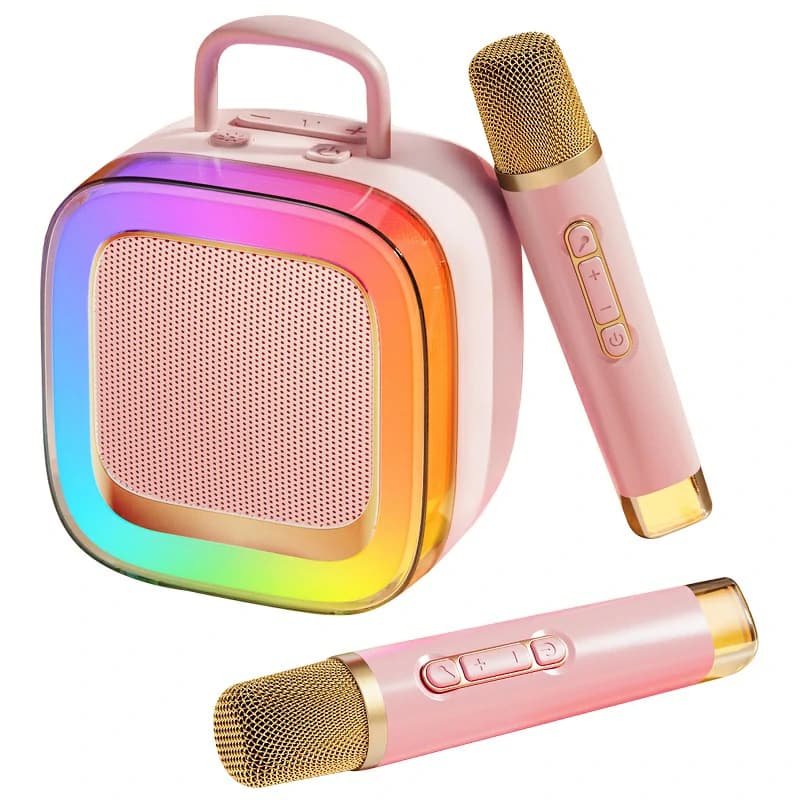
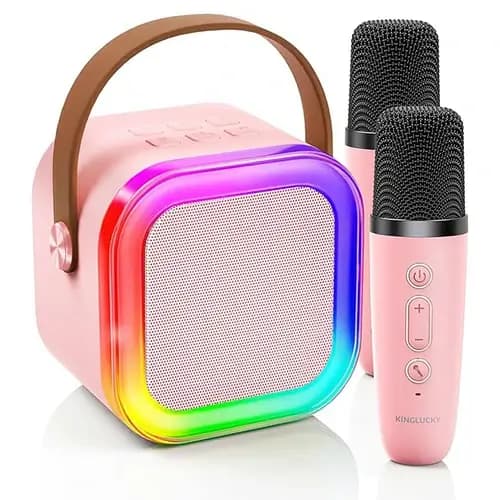
All-in-One Karaoke Box
Integrated speakers, mic receiver, and effects in one unit. Simple to move, usually includes two wireless mics. Confirm inputs (AUX/optical/HDMI via extractor).
Soundbar + Mic Hub
Use your TV soundbar for music and a compact mic receiver/mixer for vocals. Inputs: HDMI ARC/eARC, optical, or AUX. Quality hubs keep latency low.
Compact PA + Mixer
Small PA speakers (5–10") plus a basic mixer with echo/reverb and EQ. More cables, but best control and headroom for bigger rooms.
Smart TV/Tablet + Wireless Mics
Flexible and budget-friendly (YouTube or karaoke apps), but requires careful latency planning so lyrics match audio.
What matters across types:
- Watts ≠ loudness: Speaker sensitivity (dB @ 1W/1m) and enclosure design often matter more than raw power.
- Speaker size: 5–6.5" drivers excel at nearfield clarity; 8–10" drivers add low-mid fullness and headroom.
- Mic RF band: UHF and well-designed 2.4 GHz are both viable; place receivers away from routers/metal clutter.
- DSP & protection: Processing can reduce harshness, prevent clipping, and provide tools (EQ, key change, vocal cancel).
The 5 Pillars of a Great Home Karaoke Machine
Pillar 1: Sound Quality & Loudness Control
- Vocal clarity at conversational to lively volumes; avoid muddy 200–400 Hz.
- Fine volume steps so “quiet night” and “family fun” are both easy.
- Driver sizing: 5–6.5" for small rooms; 8–10" for medium/large rooms.
Pillar 2: Microphones (Clarity, Range, Feedback Control)
- UHF or robust 2.4 GHz with frequency-hopping; low self-noise and stable range.
- On-mic mute and gain; windscreens for hygiene and reduced breath noise.
- Feedback mitigation: speakers in front of singers, angled away from mics; notch EQ around 4–8 kHz if needed.
Pillar 3: Connectivity & Latency
- Best AV sync: HDMI (ARC/eARC) or optical from TV to speakers; wired mic → mixer → speaker.
- Bluetooth can add lip-sync delay. If used, pick low-latency modes and minimize wireless hops.
- HDMI audio extractors route video to TV and audio to speakers with minimal delay.
Pillar 4: Effects & Vocal Tools
- Echo/reverb adds space; keep it short and subtle to preserve intelligibility.
- Key change/pitch shift helps match vocal ranges; treat vocal cancel as a bonus.
- Basic EQ: small cuts beat big boosts; trim mud, add a touch of presence.
Pillar 5: Usability & Family Proof
- Fewer boxes and clear labeling = faster singing.
- Remote/app control and quick-charge if battery-powered.
- Rugged handles and safe mic storage.
Song Sources (Where Your Karaoke Tracks Come From)
- YouTube on Smart TV: Ubiquitous but variable quality/ads. Send video to TV via HDMI and audio to speakers on a low-latency path.
- Karaoke Subscription Apps: Synced lyrics, key change; confirm platform support or plan casting/HDMI.
- Local Files (USB/HDMI): Reliable and ad-free; check lyric compatibility and keep audio routing simple.
Principle: Keep video → TV and audio → speakers on the shortest, lowest-latency route to avoid wireless microphone latency issues.
Scoring Rubric (Use to Judge Any Machine)
Score each category 0–5, multiply by the weight, then total to 100.
| Category | Weight | What to check |
|---|---|---|
| Sound quality & clarity | 20% | Vocal intelligibility at low–moderate volume; minimal muddiness. |
| Mic performance & feedback resistance | 20% | Range, dropouts, on-mic controls; how early feedback appears. |
| Connectivity & latency management | 20% | HDMI/optical availability, clean signal path, consistent AV sync. |
| Ease of setup/use | 15% | Time from box to singing; labeling; remote/app clarity. |
| Loudness at home-friendly levels | 10% | Fine volume steps; dynamic “punch” without cranking. |
| Effects & vocal tools | 10% | Echo/reverb quality; key change; simple, useful EQ. |
| Portability & build | 5% | Weight, handles, battery/charging (if any), durability. |
How to apply: Rate 0–5 (0 = poor, 5 = excellent), multiply by weight, add totals. Use the result to decide what is best karaoke machine for home for your scenario.
Quick Comparison Table (Home Essentials at a Glance)
| System Type | Room Size Fit | Mic Band | Key I/O (HDMI/Opt/BT) | Latency Notes | Effects | Battery | Notable Trade-off |
|---|---|---|---|---|---|---|---|
| All-in-One Box | Small–Medium | UHF / 2.4 GHz | AUX/BT; optical/HDMI via extractor | Shortest chain if audio is wired; BT may add delay | Echo, basic EQ, sometimes key change | Sometimes | Compact; deepest bass limited; simplicity wins |
| Soundbar + Mic Hub | Small–Medium | UHF / 2.4 GHz | HDMI ARC/eARC, Optical, AUX | Excellent sync if TV uses ARC and hub is wired | Hub-dependent | No | Mapping inputs can be fiddly; hub quality matters |
| Compact PA + Mixer | Medium–Large | UHF typical | HDMI via extractor; Optical; XLR/TRS | Lowest latency when fully wired | Echo/reverb, EQ, key change (mixer-dependent) | No | More cables/gear; best control & headroom |
| Battery Party Box | Small–Medium / Outdoor | UHF / 2.4 GHz | AUX/BT; some add Optical/HDMI via add-ons | Keep chain short; prefer wired AUX | Echo, sometimes reverb | Yes | Convenience over ultimate fidelity; watch BT delay |
| Smart TV + Dual Mics (no extra speakers) | Small | 2.4 GHz common | TV via HDMI; mics to TV or bar | Often highest latency; okay for casual fun | App-based | No | Easiest start; weakest audio and control |
| Soundbar + Wireless Sub + Mic Hub | Medium | UHF / 2.4 GHz | HDMI eARC / Optical | Great A/V sync if wired | Hub-dependent (some key change) | No | Sub adds rumble—be mindful of neighbors |
| PA Satellites (2× 8–10") + Mixer | Large / Garage | UHF typical | HDMI extractor / Optical / XLR | Fully wired = best sync | Full control | No | Pro-leaning; requires stands and storage space |
Match Your Room Size & Neighbors
Small (≤ 12 m²)
- Prioritize nearfield clarity at low volume; all-in-one or soundbar + mic hub works well.
- Place speakers at ear height; toe-in slightly; avoid corners to reduce boom.
Medium (12–25 m²)
- Consider soundbar + mic hub or compact PA (6–8"). Increase mic-to-speaker distance (1–2 m).
- Keep speakers in front of singers to reduce feedback.
Large (25–40 m²)
- Use 8–10" speakers or dual-satellite PA. Stand-mount so tweeters are near ear height.
- Use mixer EQ: gentle low-mid cut for clarity; add a touch of reverb.
Neighbors & Quiet Hours
- Use rubber feet/risers to reduce floor transmission; avoid placing speakers against shared walls.
- Rely on clarity and EQ instead of sheer volume; cap the master and keep consistent levels.
At-Home Tests You Can Replicate (5–10 Minutes)
- Lip-Sync Test: Play a lyrics video. Record a single clap in front of the TV; replay in slow motion. If clap aligns with sound and visuals, your path is solid. If not, switch to wired audio or adjust TV audio settings.
- Mic Feedback Walk: Start with low gain. Walk a semicircle in front of speakers while slowly raising gain. Note where squeal begins and back off; add distance, reduce echo, or notch EQ 4–8 kHz if needed.
- Clarity Check: Read a pangram (“The quick brown fox…”). Listen for sibilance, boxiness (200–400 Hz), or nasal peaks. Apply small EQ cuts.
- Duet Test: Use two mics. Set one slightly louder; confirm both remain intelligible without pumping or distortion.
- Neighbor-Friendly Test: Set a lively but low volume. Step into the hallway or next room—speech should be intelligible without wall-shaking bass.
- Battery Reality (if portable): Run 30 minutes at party volume and note the drop; store lithium packs at 20–80% when not in use.
Setup Blueprints (Minimal to Max Quality)
Fast Plug-and-Sing (≈ 10 min)
- Chain: Smart TV → soundbar via HDMI ARC; dual 2.4 GHz mics → soundbar AUX (or via a compact mic hub).
- Why: Minimal boxes, reliable AV sync, easy remote volume.
- Tips: Disable extra TV post-processing; keep mic receiver away from Wi-Fi routers.
Balanced Family Setup (≈ 30–45 min)
- Chain: TV → HDMI audio extractor → optical or analog to compact PA / powered speakers; two UHF mics into a simple mixer with echo.
- Why: Clean sync, better mic control, easy duets.
- Tips: Stand-mount speakers; use gentle low-mid trim for lyric intelligibility.
Party-Ready (60+ min)
- Chain: TV (wired HDMI) → extractor → mixer → 10" PA speakers on stands; multiple UHF mics; key change + reverb dialed in.
- Why: Headroom for big spaces, best feedback control, clear vocals at volume.
- Tips: Keep speakers ahead of singers and angled outward; label and tape cables for safety.
Safety, Etiquette & Care
- Hearing: Keep treble moderate at close range; take breaks every 30–45 minutes.
- Mic hygiene: Use washable windscreens; disinfect grilles; avoid cupping the capsule.
- Placement: Avoid corner/edge-loading that boosts boom; elevate speakers to ear height.
- Cable management: Tape crossings; coil slack; separate power and signal at right angles.
- Maintenance: Update firmware/apps when available; store batteries at 20–80%; use dust covers.
FAQs
What connections minimize karaoke lip-sync delay at home?
Prefer wired HDMI (ARC/eARC) or optical from TV to speakers, and a wired mic → mixer → speaker chain. If you use Bluetooth, keep the path short and enable low-latency modes.
Are wireless mics reliable in apartments with lots of Wi-Fi?
Yes, with good design. UHF avoids the 2.4 GHz Wi-Fi band; robust 2.4 GHz systems can still perform well with frequency-hopping and solid receivers. Keep receivers away from routers and metal shelves.
Do I need a subwoofer for karaoke?
Not necessarily. Clear mids and presence matter more for lyrics. In small rooms a sub may annoy neighbors; in larger rooms a modest sub at low level can add body if it doesn’t mask vocals.
What’s the difference between echo and reverb—and how much is too much?
Echo is a distinct repeat; reverb is a dense “space.” Use short, subtle settings. If words blur, reduce time/mix until consonants are crisp.
How loud is “too loud” for neighbors?
If speech is fully intelligible in a hallway or through a wall, you are likely too loud. Rely on EQ and placement for clarity rather than raising the master volume.
Can I run mics through a soundbar?
Yes, via a mic hub or mixer feeding the soundbar’s AUX/optical/HDMI input (model-dependent). For best AV sync, keep mics and TV audio in the same, preferably wired, path.
Conclusion
The real answer to “what is best karaoke machine for home” is not a single model—it is the system that matches your room size, neighbors, mic needs, song sources, and latency path. Use the rubric to compare options fairly, match speakers to the room, and run the quick tests (lip-sync, feedback walk, clarity, duet, neighbor-friendly) to validate any choice in minutes. When in doubt, favor clean, wired signal paths, precise volume control, and small EQ adjustments for crystal-clear vocals at home-friendly levels.
Recommended Products