How to Use Clip On Earbuds: Complete Setup-to-Daily-Life Guide
People search how to use clip on earbuds because clip-on designs promise open-ear comfort with a secure, glasses-friendly fit. This page is a practical manual, covering first-time setup and pairing, how to wear and adjust for comfort, real-world use (music, calls, meetings, voice assistants), best scenarios, care, and quick fixes. If you’ve ever wondered how to connect clip on earbuds or how to adjust clip on earbuds for comfort, you’ll find everything you need below.
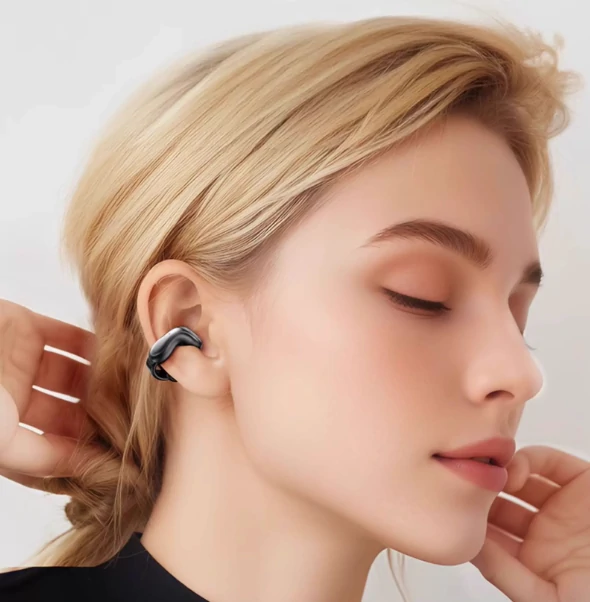
What Are Clip-On Earbuds and How They Differ
Clip-on earbuds are lightweight earpieces that rest on the outer ear (the pinna) and secure with a soft clip or micro ear-hook. Instead of sealing the ear canal, the speaker port aims sound toward the canal entrance while your ear remains open for awareness and comfort.
- Versus in-ear earbuds: No deep insertion, less pressure and heat, easier long sessions.
- Versus bone conduction headsets: Bone conduction vibrates the cheekbone and often favors speech intelligibility; clip-on air-conduction sounds more like traditional earbuds while staying open.
- Versus over-ear headphones: Far lighter, more glasses-friendly, and less heat from earcups or headbands.
Step 1 – Setting Up Your Clip-On Earbuds
Charge Before First Use
- Place the earbuds in the charging case or connect via cable and charge fully until the LED indicates 100%.
- A complete first charge calibrates the battery gauge for more accurate readings.
Power On / Power Off
- Power on: Remove from case (auto-on for most) or long-press the multifunction button until you hear the tone.
- Power off: Return to case or long-press until the shutdown prompt plays.
- Learn the beeps/voice prompts that indicate pairing, connection, and battery level.
Pairing with Bluetooth Devices
- Put the earbuds into pairing mode (usually by opening the case lid or holding the button until the LED blinks).
- On your phone/tablet/laptop, open Bluetooth → Add New Device → choose your earbuds from the list.
- Accept any prompts for audio/calls. Rename the earbuds in Bluetooth settings so you can find them quickly later.
- Repeat on other devices. If your model supports multipoint, you can stay connected to two devices at once.
Tip: If pairing fails, “Forget” the device in Bluetooth settings, reboot Bluetooth, then re-enter pairing mode and try again.
Step 2 – Wearing and Adjusting for Comfort
Proper wear gives you clarity at lower volumes and a stable fit. This is the heart of how to use clip on earbuds comfortably every day.
Identify Left/Right
- Find the small L and R marks. Correct sides matter for speaker aim and microphone orientation.
Roll On the Clip
- Hold the earbud with the speaker port facing your ear canal.
- Roll the clip over the top of your ear so it sits behind the ear while the body rests in the concha (the bowl near the canal).
- If your model has a hinged clip, gently open, seat, and release—no pinching required.
Micro-Rotate for Sound Balance
- Slightly rotate the earbud until voices sound centered and full at low volume.
- Keep the body flush against your ear; gaps reduce clarity and stability.
Glasses, Hats, and Helmets
- Glasses first, then earbuds. Seat the clip behind the frame arm so it touches skin, not plastic.
- With hats or helmets, wear the clip a few millimeters lower to avoid dislodging when removing headwear.
Quick Stability Test
- Look down, then left/right; do a gentle head shake. If anything shifts, re-aim the port and seat the clip farther behind the ear apex.
- For running or gym use, do a 30-second jog-in-place test to confirm a secure fit.
Shortcut: “Roll on → micro-rotate.” Once your angles are set, wearing takes seconds.
Step 3 – Using Clip-On Earbuds in Daily Life
Music and Podcasts
- Start at low volume, then fine-aim the port before raising the level. Proper aim gives you fuller sound at safer volumes.
- Optional EQ: a gentle +2–3 dB below ~150 Hz for warmth and a small lift around 2–3 kHz for presence. Avoid heavy boosts that cause fatigue.
Calls and Online Meetings
- Keep hair and mask straps away from mic vents for clear pickup.
- In wind, face slightly leeward to reduce turbulence.
- Enable noise suppression in Zoom/Teams to improve far-end clarity without blasting your own volume.
Voice Assistants (Siri, Google Assistant)
- Trigger via press-and-hold or multi-tap (varies by model). Use voice for quick actions—timers, messages, calls.
- If gestures conflict with app controls, check the companion app or Bluetooth settings to remap.
Switching Between Devices
- With multipoint, earbuds can stay connected to (for example) your laptop and phone simultaneously.
- Handoffs usually occur automatically when a call starts; otherwise pause on one device and play on the other.
- Without multipoint, toggle Bluetooth off on device A, then select the earbuds from device B to reconnect quickly.
Step 4 – Best Scenarios for Clip-On Earbuds
Sports & Outdoor Use (Running, Cycling, Walks)
- Clip-ons excel when you need awareness + stability.
- For using clip on earbuds for running: ensure secure fit (behind ear apex), keep volume moderate to hear traffic, and dry contact points after workouts.
Commuting (Staying Aware)
- Keep volume conservative on trains or in quiet cars to limit sound leakage.
- Open-ear fit lets you hear announcements and quick conversations without removing the earbuds.
Office & Study (All-Day Comfort)
- Because there’s no canal seal, many users can listen longer with less fatigue.
- Precise aim lets you listen at lower volumes—better for focus and for colleagues nearby.
Casual Listening at Home
- Great for cooking and chores: no headband and no ear-canal pressure.
- If you notice A/V lag, enable low-latency mode (if available) or use your device’s audio/video sync feature.
Example model: Kinglucky A9 (clip-on, open-ear) is glasses-friendly and easy to “roll on & go,” which makes it a good practice model for first-time users.
Maintenance & Care Tips
- Daily wipe-down: After sweaty sessions, wipe clip contact points and ports with a dry, soft cloth for better grip and hygiene.
- Occasional deep clean: Use a slightly damp microfiber on the clip (avoid moisture on charge pins or speaker ports). Skip harsh solvents unless recommended.
- Battery management: Frequent top-offs are fine. Avoid extreme heat/cold. For long storage, leave the charge around 40–60%.
- Safe storage: Stow in the charging case to protect drivers and keep contacts clean—don’t toss them loose in a bag.
Troubleshooting Common Issues
Earbuds Slipping During Activity
- Re-aim the port and seat the clip farther behind the ear apex.
- Dry skin and clip surfaces to increase friction.
- Install anti-slip pads if your model includes them.
Sound Leakage in Quiet Spaces
- Lower volume and fine-aim the speaker for clearer audio at lower levels.
- Pause media during meetings; rely on call-side noise suppression for your voice.
Bluetooth Connection Drops
- Keep phone and earbuds within line of sight; avoid metal-blocked pockets.
- Toggle Bluetooth off/on and reconnect; if needed, “Forget” then re-pair.
- Update firmware in the companion app (if available).
Discomfort with Glasses
- Glasses on first; place the clip behind the frame arm so it touches skin, not plastic.
- Wear the clip slightly lower to reduce temple pressure; use the lowest usable tension.
Calls Sound Distant or Windy to Others
- Keep hair and mask straps away from the mic vents.
- Turn your face slightly leeward in wind; enable noise reduction in the app if present.
Uneven Sound Between Ears
- Re-fit both sides; tiny angle differences can change perceived loudness.
- Use your device’s balance control to confirm whether it’s fit or hardware.
Conclusion
How to use clip on earbuds is simple when you follow a sequence: charge, pair, roll on the clip, micro-rotate for centered sound, and test stability. From there, you can enjoy comfortable listening, clear calls, and easy awareness at home, on commutes, in the office, and while exercising. With a little practice, clip-ons become your most versatile daily audio companion.
FAQ
How do you connect clip-on earbuds to your phone?
Enter pairing mode (LED blinks), open your phone’s Bluetooth settings, select the earbuds, and confirm. If available, enable multipoint to stay connected to a second device like a laptop.
Can I use clip-on earbuds while running?
Yes. Roll on the clip, seat it behind the ear apex, and do a 30-second jog-in-place test. Keep volume moderate so you remain aware of traffic and cyclists.
Are clip-on earbuds comfortable with glasses?
They can be. Wear glasses first, then place the clip behind the frame arm to hug skin, not plastic. Rounded, soft-touch clips help reduce pressure.
How long can I use clip-on earbuds on one charge?
It varies by model, but many offer 6–10 hours per charge and 20–40 hours total with the case. Battery life drops at higher volumes and in cold weather.
What’s the best way to reduce sound leakage?
Lower the volume and micro-rotate the speaker port toward the canal. Better alignment improves clarity at lower levels and reduces audibility to bystanders.


