
How to Connect 2 Bluetooth Speakers
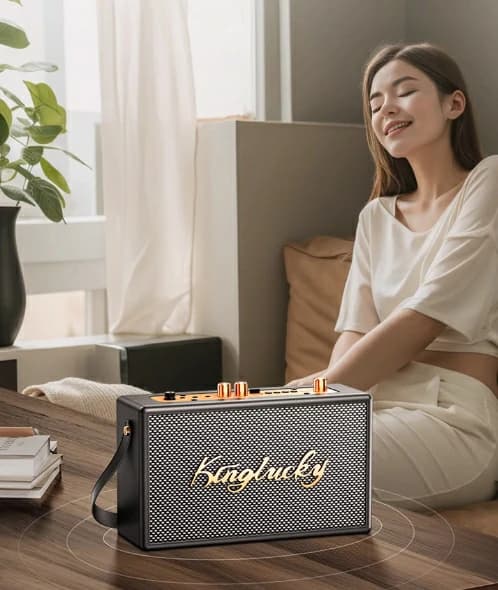
Introduction
Picture this — you're socializing, prepping for a journey or gearing up for an event. A single Bluetooth speaker suffices, but what about doubling the sound? Two linked Bluetooth speakers offer enhanced sound; stereoscopic effects, and extended coverage. Particularly beneficial for those seeking ubiquitous music throughout indoor/outdoor spaces.A growing number of Bluetooth speakers facilitate multi-device connections, simplifying the process. Whether a modest gathering or extensive musical entertainment, integrating two Bluetooth speakers provides a superior, immersive auditory experience.
Compatibility and Requirements

It's encouraging to know numerous brands support dual Bluetooth speaker connections. Yet, some impose ecosystem restrictions demanding identical models or exclusive brand apps. Others, such as Kinglucky K50 and Kinglucky F11, are flexible, supporting concurrent connections across diverse devices.
Device Support
Prioritize checking your device's Bluetooth version. To support simultaneous two Bluetooth speaker links, devices must have Bluetooth 5.0 or superior. Older versions may face connectivity issues or require workarounds, utilizing third-party apps or Bluetooth splitters.
Device Requirements

- Dual-mode Bluetooth: Allows your device to transmit audio to two Bluetooth devices concurrently.
- TWS (True Wireless Stereo): Several Bluetooth speakers, including the Kinglucky K50 and Kinglucky F11, support TWS, functioning asstereo pairs.
- Bluetooth Version: Bluetooth 5.0 or above on your device guarantees superior connectivity and audio fidelity.
- Popular Bluetooth Speakers Supporting Dual Connections
Consider these two products supporting this feature:
- Kinglucky K50: Equipped with Bluetooth 5.0, 40W power, and dual speaker pairing capabilities, suitable for indoor/outdoor audio.
- Kinglucky F11: Featuring Bluetooth 5.3, this speaker assures rapid, reliable connections and pristine sound, ideal for dual speaker configurations.
Connection Steps

Android (Bluetooth 5.0+)
- Settings: Access your phone's Settings and navigate to 'Connections.'
- Bluetooth Pairing: Pair each speaker separately while ensuring both are in pairing mode.
- Enable Dual Audio: Post pairing, activate the 'Dual Audio' feature under Bluetooth settings. Both speakers should now receive audio from the same source.
iOS (iPhone with iOS 13+)
- Connect First Speaker: Pair your initial Bluetooth speaker via Settings > Bluetooth.
- Control Center: Swipe down from the top-right corner and tap on the AirPlay icon.
- Select Both Speakers: Choose both speakers from the available devices.
Windows 10:
- Pair Both Speakers: Access the Bluetooth settings and link both speakers independently.
- Sound Settings: Right-click on the volume icon, select 'Sounds,' and proceed to the 'Playback' tab.
- Stereo Mix: Activate 'Stereo Mix' to permit both speakers to play audio simultaneously.
Bluetooth Splitter or Adapter:
For those opting for hardware solutions, a Bluetooth splitter or adapter can effectively connect multiple speakers. These devices interface with your audio source and broadcast Bluetooth signals to two or more speakers.
Troubleshooting Guide

- Speaker Pairing Difficulties: Ensure both speakers are in pairing mode and located closely to your device. Resetting your device may also solve the problem.
- Synchronization Issues: If one speaker is too distant or interference is present, realign them within the prescribed range.
- Sound Quality Impairments: Battery levels or distance impact audio quality. Always maintain sufficient charging and keep the speakers near your device.
- Connection Instability: Obstacles or concurrent Bluetooth devices can interfere with signal strength. Maintain a clear line of sight between the speakers and audio source.
For additional assistance, refer to the speaker's user guide or visit the manufacturer's support site.
Notes on Bluetooth Range Limits
The typical Bluetooth range is approximately 10 meters (33 feet). Maintaining this distance ensures reliable connection without delays or interruptions.Latency Considerations
While minor latency is expected when linking two speakers, the greater their separation, the more pronounced the delay becomes.
Bluetooth Speaker Recommendations
Kinglucky K50 and F11: Interconnectable Bluetooth Speakers with Advanced FeaturesThe Kinglucky K50 and Kinglucky F11 both offer the ability to be interconnected using TWS (True Wireless Stereo) technology. This means you can pair two speakers together to create a richer, stereo sound experience. Whether you’re using them for a home setup or an outdoor event, this feature lets you enjoy seamless audio from multiple devices, amplifying your sound without the hassle of wires.
Kinglucky K50 Bluetooth Water Resistant Wireless Speaker

- 40W high-power output: Delivers deep, punchy bass and crisp highs, ideal for both indoor and outdoor use.
- TWS pairing: Pair two K50 speakers for an immersive stereo effect.
- Rugged and waterproof: Perfect for outdoor events or adventures.
- Bluetooth 5.0: Ensures faster connection, lower power consumption, and greater stability over longer distances.
- Multi-mode compatibility: Works with phones, tablets, laptops, and supports multiple input options like AUX and USB.
Kinglucky F11 Small Bluetooth Speaker With Bass

- Compact and portable: Easy to carry, making it perfect for travel or smaller spaces.
- 360° stereo sound: Even sound distribution for a better listening experience no matter where you are.
- Bluetooth 5.3: Ensures faster, more stable connections with lower latency and interference.
- TWS pairing: Like the K50, you can pair two F11 speakers to create a fuller, more expansive audio experience.
- AI noise reduction: Ideal for clear audio during phone calls, even in noisy environments.
Both the Kinglucky K50 and F11 are excellent choices if you’re looking for interconnectable speakers that provide great sound, portability, and advanced Bluetooth technology. Whether you prefer the power of the K50 or the compact convenience of the F11, both models enhance your audio experience with ease.
Conclusion
Linking two Bluetooth speakers significantly enhances your auditory experience, be it for home stereo or amplified outdoor events. With an expanding array of Bluetooth speakers supporting dual connections, such as the K50 and F11 from Kinglucky, setup processes have never been simpler.Given this knowledge about integrating dual Bluetooth speakers, why not experiment? We welcome your feedback and look forward to hearing about your audio transformation journey!