
How to Use a Lavalier Microphone? Those Who Don't Know How to Use a Lavalier Microphone, Look Here!
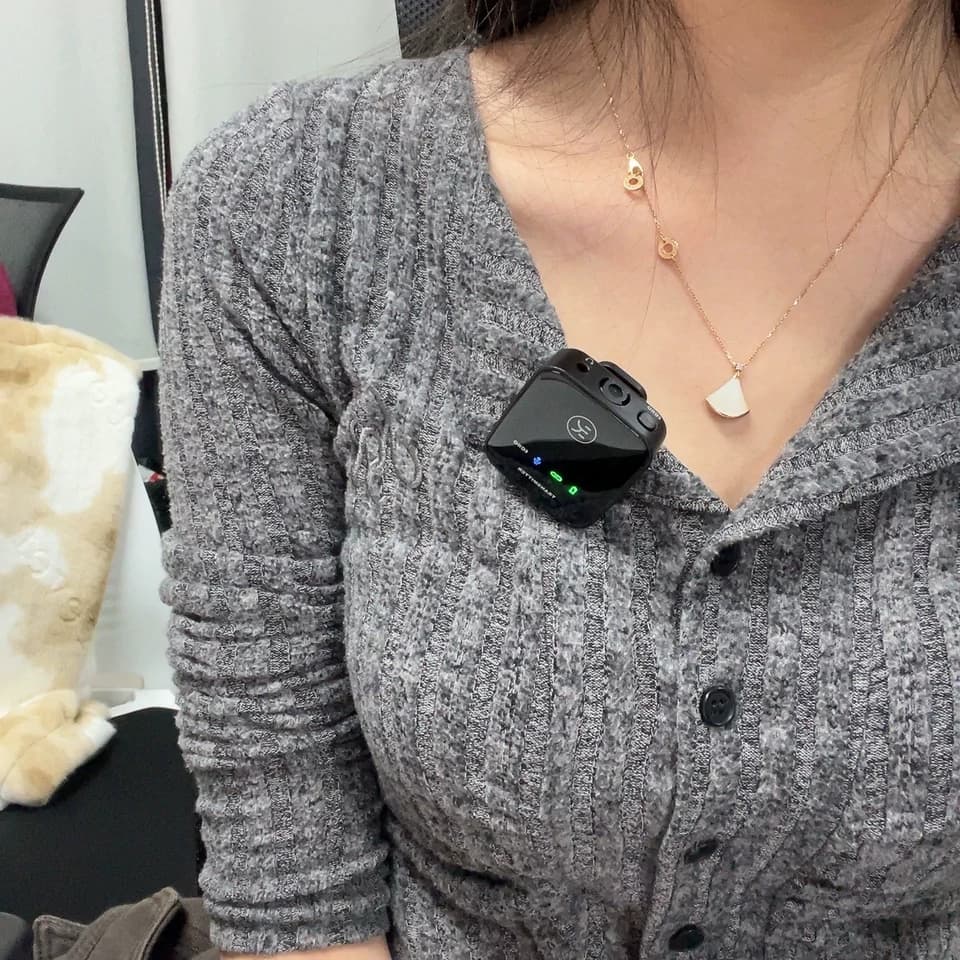
Facing confusion in the realm of lavalier microphones? Fear not, you're at the appropriate destination! Regardless of whether you're prepping for an influential presentation, initiating your vlog, or aiming to improve your audio performance, understanding lavalier mic usage is crucial. Surprisingly, it's not as complex as it appears. We'll guide you through the intricacies of using a lavalier mic, utilizing the KINGLUCKY M19 as our prime example. From setup to resolution of issues, we've got your needs covered. Stay tuned for crystal-clear audio!
What is a Lavalier Microphone?
Prior to delving deeper, let's clarify fundamental concepts. A lavalier mic, colloquially known as a lapel mic or lav mic, is a compact, clip-on microphone. Often spotted adorning TV presenters' attire or dangling from YouTube influencers' collars, why are they preferred? Their discretion, hands-free operation, and superior audio quality make them ideal for interviews, presentations, and live recordings.
 Why Utilize a Lavalier Microphone?
Several factors favor choosing a lavalier mic over others:
Hands-Free Operation: Attach it, and you're ready to proceed! No need to juggle anything, freeing your hands for gestures or handling additional equipment.
Consistent Audio Quality: Being positioned near your mouth, the audio level remains consistent, unlike a handheld mic that may capture fluctuations during movement.
Discreet: Compact and inconspicuous, lavalier microphones enhance your visual presentation. Ideal for video production and live shows!
Types of Lavalier Microphones
Lavalier microphones primarily fall under two categories: wired and wireless. Each type has its advantages and disadvantages, hence, let's analyze them:
1. Wired Lavalier Microphones: These are straightforward—simply connect them to your recording device. They don't necessitate batteries and are generally more dependable due to minimal wireless interference. However, they restrict mobility due to the tethering cable.
2. Wireless Lavalier Microphones: Offering freedom of movement without cables, these comprise a transmitter (attached to the mic) and a receiver (linked to your recording device). They're more adaptable but susceptible to interference and battery requirements.
 The Kinglucky M19 Lavalier Microphone - An Overview
Now, let's focus on our featured product—the Kinglucky M19 lavalier microphone. This innovation in the industry features 2.4G wireless technology enabling swift, one-second connection. Compatible with a wide range of devices including smartphones, tablets, computers, and cameras, it boasts an advanced noise-cancellation chip for clear audio transmission. With its compact design, it caters well to travelers of all professions: teachers, vloggers, or live-streaming enthusiasts.
How to Use a Lavalier Microphone?
Presently, we proceed to the crucial task of usability instruction: a systematic procedure to swiftly acquaint you with its operation.
Step 1: Unpack and Recharge
Initially, extract the microphone from its packaging. The Kinglucky M19 package includes a receiver, transmitter, and the lavalier mic. Prior to usage, ensure the transmitter and receiver are sufficiently charged.
Step 2: Connect the Receiver
Post charging, connect the receiver to your recording apparatus. This may encompass your smartphone, tablet, or camera. The Kinglucky M19 receiver is universally compatible, requiring no adapters. Simply insert it into the audio jack or USB-C port.
Step 3: Activate the Microphone
Subsequently, activate the transmitter by pressing and holding the designated button until a light indicator illuminates, signifying power activation. The Kinglucky M19's automatic pairing function eliminates the need for manual configuration.
Step 4: Attach the Mic and Test
Fasten the lavalier mic to your attire, ideally positioned at a distance of 6-8 inches from your mouth. Conduct a brief audio test to verify absence of extraneous noise or distortion.
Step 5: Commence Recording!
Upon satisfaction with audio quality, commence your recording endeavor. Regardless of whether you're shooting a video, streaming live, or conducting an interview, the Kinglucky M19 guarantees pristine sound.
 Common Lavalier Microphone Troubleshooting
Despite technological advancements, occasional glitches may occur. Here are potential issues and resolutions for your lavalier mic:
No Sound/Low Volume: Verify secure connection of the mic. For wireless systems, confirm both transmitter and receiver are activated and paired. Review your recording device's audio settings.
Static/Interference: Wireless interference may be responsible. Consider relocation or distancing yourself from interfering devices. Frequency adjustments (if applicable) may alleviate the issue.
Audio Distortion: This typically occurs when the mic is excessively close to your mouth. Position it further down your garment. Examine the microphone for physical obstructions.
Battery Issues: Frequent interruptions may indicate battery depletion. Ensure both the transmitter and receiver are fully charged prior to usage.
Optimization Tips for Optimal Results
Here are a few strategies to maximize the performance of your lapel mic:
Mask Wires: When being filmed, conceal visible cables by routing the mic cable beneath attire.
Invest in a Wind Muff: For outdoor recordings, acquire a wind muff or foam cover to mitigate wind noise.
Consider Positioning: Minimize movement of the mic near potential sources of rustling such as jewelry or clothing.
Maintain Audio Monitoring: Use headphones to monitor audio frequently. This enables timely correction of issues.
 What are some additional tips for using a lavalier microphone foroptimal sound quality?
When using a lavalier microphone, it is important to ensure optimal sound quality through the use of positioning, distance, and soundproofing.
Firstly, positioning is crucial. The lavalier microphone should be placed directly on the speaker's chest, ensuring that it is not too close or too far away. Too close can result in muffled sound, while too far away can result in poor audio quality.
Secondly, distance is also important. The microphone should be positioned at a distance that allows for clear and undistorted sound. This distance can vary depending on the speaker's voice and the environment, but typically, it should be between 10 and 20 centimeters.
Lastly, soundproofing is essential. The lavalier microphone should be placed in a soundproofed area to prevent external noise from interfering with the recording. This can be achieved by using soundproofing materials such as foam or blankets.
By following these tips, you can ensure that your lavalier microphone produces high-quality sound for your recording needs.
Frequently Asked Questions Regarding Lapel Microphone Usage
1. Is it feasible to utilize a lapel mic with a smartphone?
Indeed, most lapel mics like the KINGLUCKY M19 are compatible with smartphones via receiver attachment to the audio jack or USB-C adapter.
2. How can I prevent background noise from being picked up by the lapel mic?
Position the mic closely to your mouth and employ the integrated noise cancellation features. Consider using a wind muff or foam cover in noisy settings.
3. What steps should I take when my lapel mic malfunctions?
Initially, verify the connections and power. Ensure the battery is charged and both the transmitter and receiver are paired. Consult the user manual for further assistance.
4. Can multiple lapel mics be used simultaneously?
Yes, provided a multi-channel system is utilized to assign unique frequencies for reduced interference.
Conclusion
The complete usage guide for a lapel mic has been laid out for effective reference. The novice or experienced user can effortlessly navigate through the process with the KINGLUCKY M19 due to its straightforward set-up, noise cancellation capabilities, and wireless convenience. Be prepared to record superior quality audio anywhere with this mic.
Whenever confronted with the question, "How to use a lapel mic?" simply refer them to this guide. Happy recording!
What is a Lavalier Microphone?
Prior to delving deeper, let's clarify fundamental concepts. A lavalier mic, colloquially known as a lapel mic or lav mic, is a compact, clip-on microphone. Often spotted adorning TV presenters' attire or dangling from YouTube influencers' collars, why are they preferred? Their discretion, hands-free operation, and superior audio quality make them ideal for interviews, presentations, and live recordings.
Several factors favor choosing a lavalier mic over others:
Hands-Free Operation: Attach it, and you're ready to proceed! No need to juggle anything, freeing your hands for gestures or handling additional equipment.
Consistent Audio Quality: Being positioned near your mouth, the audio level remains consistent, unlike a handheld mic that may capture fluctuations during movement.
Discreet: Compact and inconspicuous, lavalier microphones enhance your visual presentation. Ideal for video production and live shows!
Types of Lavalier Microphones
Lavalier microphones primarily fall under two categories: wired and wireless. Each type has its advantages and disadvantages, hence, let's analyze them:
1. Wired Lavalier Microphones: These are straightforward—simply connect them to your recording device. They don't necessitate batteries and are generally more dependable due to minimal wireless interference. However, they restrict mobility due to the tethering cable.
2. Wireless Lavalier Microphones: Offering freedom of movement without cables, these comprise a transmitter (attached to the mic) and a receiver (linked to your recording device). They're more adaptable but susceptible to interference and battery requirements.
Now, let's focus on our featured product—the Kinglucky M19 lavalier microphone. This innovation in the industry features 2.4G wireless technology enabling swift, one-second connection. Compatible with a wide range of devices including smartphones, tablets, computers, and cameras, it boasts an advanced noise-cancellation chip for clear audio transmission. With its compact design, it caters well to travelers of all professions: teachers, vloggers, or live-streaming enthusiasts.
How to Use a Lavalier Microphone?
Presently, we proceed to the crucial task of usability instruction: a systematic procedure to swiftly acquaint you with its operation.
Step 1: Unpack and Recharge
Initially, extract the microphone from its packaging. The Kinglucky M19 package includes a receiver, transmitter, and the lavalier mic. Prior to usage, ensure the transmitter and receiver are sufficiently charged.
Step 2: Connect the Receiver
Post charging, connect the receiver to your recording apparatus. This may encompass your smartphone, tablet, or camera. The Kinglucky M19 receiver is universally compatible, requiring no adapters. Simply insert it into the audio jack or USB-C port.
Step 3: Activate the Microphone
Subsequently, activate the transmitter by pressing and holding the designated button until a light indicator illuminates, signifying power activation. The Kinglucky M19's automatic pairing function eliminates the need for manual configuration.
Step 4: Attach the Mic and Test
Fasten the lavalier mic to your attire, ideally positioned at a distance of 6-8 inches from your mouth. Conduct a brief audio test to verify absence of extraneous noise or distortion.
Step 5: Commence Recording!
Upon satisfaction with audio quality, commence your recording endeavor. Regardless of whether you're shooting a video, streaming live, or conducting an interview, the Kinglucky M19 guarantees pristine sound.
Despite technological advancements, occasional glitches may occur. Here are potential issues and resolutions for your lavalier mic:
No Sound/Low Volume: Verify secure connection of the mic. For wireless systems, confirm both transmitter and receiver are activated and paired. Review your recording device's audio settings.
Static/Interference: Wireless interference may be responsible. Consider relocation or distancing yourself from interfering devices. Frequency adjustments (if applicable) may alleviate the issue.
Audio Distortion: This typically occurs when the mic is excessively close to your mouth. Position it further down your garment. Examine the microphone for physical obstructions.
Battery Issues: Frequent interruptions may indicate battery depletion. Ensure both the transmitter and receiver are fully charged prior to usage.
Optimization Tips for Optimal Results
Here are a few strategies to maximize the performance of your lapel mic:
Mask Wires: When being filmed, conceal visible cables by routing the mic cable beneath attire.
Invest in a Wind Muff: For outdoor recordings, acquire a wind muff or foam cover to mitigate wind noise.
Consider Positioning: Minimize movement of the mic near potential sources of rustling such as jewelry or clothing.
Maintain Audio Monitoring: Use headphones to monitor audio frequently. This enables timely correction of issues.
When using a lavalier microphone, it is important to ensure optimal sound quality through the use of positioning, distance, and soundproofing.
Firstly, positioning is crucial. The lavalier microphone should be placed directly on the speaker's chest, ensuring that it is not too close or too far away. Too close can result in muffled sound, while too far away can result in poor audio quality.
Secondly, distance is also important. The microphone should be positioned at a distance that allows for clear and undistorted sound. This distance can vary depending on the speaker's voice and the environment, but typically, it should be between 10 and 20 centimeters.
Lastly, soundproofing is essential. The lavalier microphone should be placed in a soundproofed area to prevent external noise from interfering with the recording. This can be achieved by using soundproofing materials such as foam or blankets.
By following these tips, you can ensure that your lavalier microphone produces high-quality sound for your recording needs.
Frequently Asked Questions Regarding Lapel Microphone Usage
1. Is it feasible to utilize a lapel mic with a smartphone?
Indeed, most lapel mics like the KINGLUCKY M19 are compatible with smartphones via receiver attachment to the audio jack or USB-C adapter.
2. How can I prevent background noise from being picked up by the lapel mic?
Position the mic closely to your mouth and employ the integrated noise cancellation features. Consider using a wind muff or foam cover in noisy settings.
3. What steps should I take when my lapel mic malfunctions?
Initially, verify the connections and power. Ensure the battery is charged and both the transmitter and receiver are paired. Consult the user manual for further assistance.
4. Can multiple lapel mics be used simultaneously?
Yes, provided a multi-channel system is utilized to assign unique frequencies for reduced interference.
Conclusion
The complete usage guide for a lapel mic has been laid out for effective reference. The novice or experienced user can effortlessly navigate through the process with the KINGLUCKY M19 due to its straightforward set-up, noise cancellation capabilities, and wireless convenience. Be prepared to record superior quality audio anywhere with this mic.
Whenever confronted with the question, "How to use a lapel mic?" simply refer them to this guide. Happy recording!